Logstash Pipelines
Logstash Pipeline is a built-in Processor Definition (type: Datacrop Service) that turns your Digital Resource wiring into a working Logstash configuration automatically. When you save a Logstash Pipeline processor manifest, the backend generates a .conf file and updates pipelines.yml — no manual file editing or Logstash restart required.
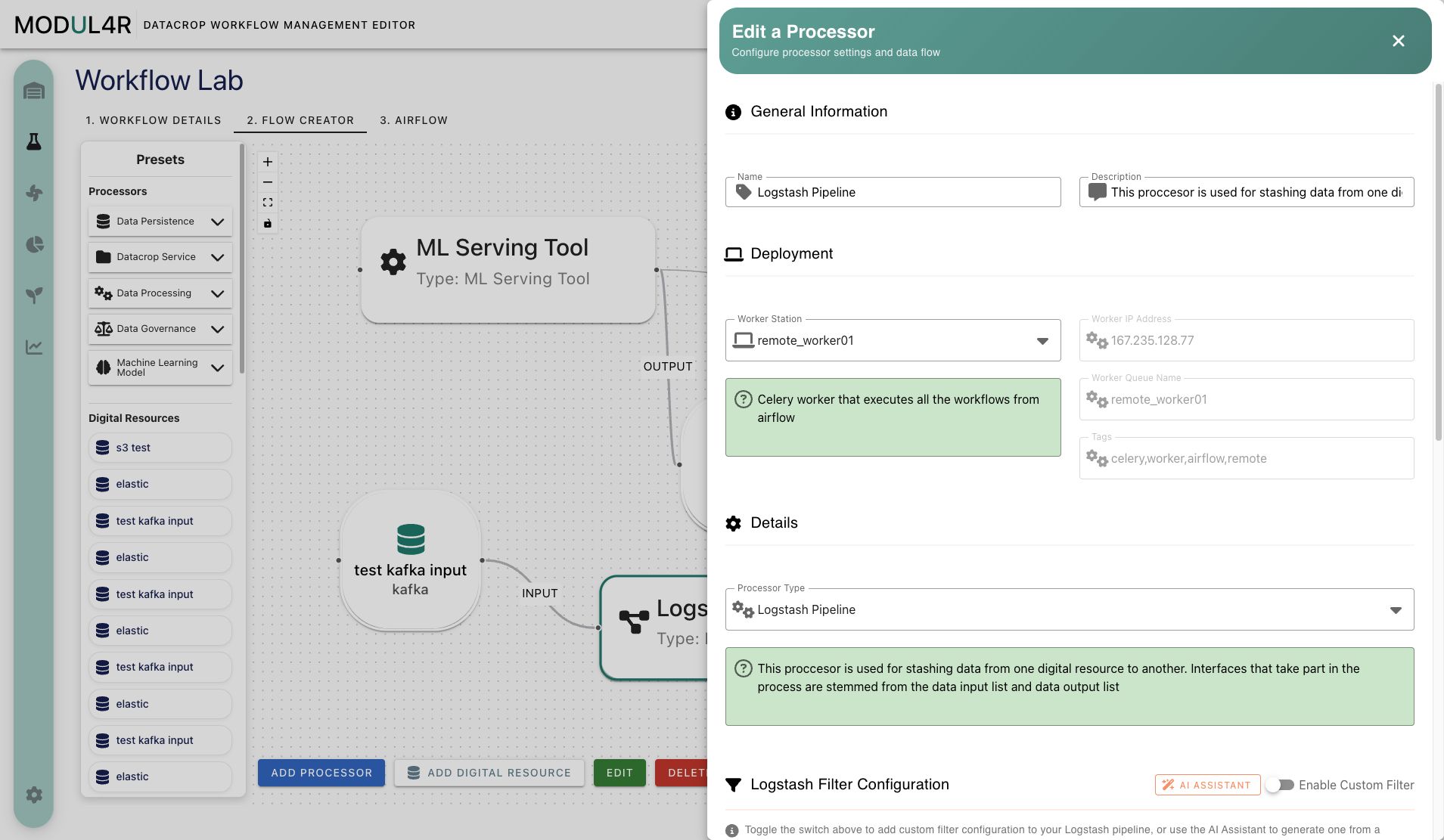
Before You Start
Run Initialize Resources from Settings (admin only) before creating Logstash Pipeline processors. This seeds the built-in Data Interface Types and their Logstash capability metadata.
Compatible Data Interface Types
Each Data Interface Type carries three capability flags that control Logstash participation:
| Flag | Meaning | Default when unset |
|---|---|---|
logstashCompatible | Type can appear in any Logstash pipeline | true |
supportsLogstashInput | Type can be used as a pipeline input source | true |
supportsLogstashOutput | Type can be used as a pipeline output sink | true |
The built-in types seeded by Initialize Resources have explicit capabilities:
| Type | Logstash plugin | Input | Output |
|---|---|---|---|
elasticsearch | elasticsearch | ✓ | ✓ |
kafka | kafka | ✓ | ✓ |
http | http | ✓ | ✓ |
s3 | s3 | ✓ | ✓ |
redis | redis | ✓ | ✓ |
rabbitmq | rabbitmq | ✓ | ✓ |
mongodb | mongodb | ✗ | ✓ |
mqtt | — | ✗ | ✗ |
When you open the Logstash Pipeline processor form in the Lab, the Data Input dropdown shows only Digital Resources whose type has logstashCompatible = true and supportsLogstashInput ≠ false. The Data Output dropdown applies the same logic with supportsLogstashOutput. The same capability check is enforced server-side when the manifest is saved — a backend error is returned if an incompatible type slips through.
Custom Data Interface Types created by admins appear in the dropdowns if their capability flags allow it. Types without explicit flags set (legacy or custom without declarations) default to supporting both directions.
Creating a Logstash Pipeline Processor
- Open Workflow Lab and add a processor node to the canvas.
- Open the processor form (double-click or Edit).
- Enable Use Existing Processor Infrastructure — Logstash is a platform service, so no worker is needed.
- Enter a Name (required) and optional Description.
- Under Details, select Logstash Pipeline as the Processor Type.
- In Processor Parameters, confirm Active is set to
true(it defaults totrue). - Under Data Flow, select one or more Digital Resources for Data Input and/or Data Output. Only compatible types appear in each dropdown.
- Optionally configure the Logstash Filter section — see The Logstash Filter Section below.
- Click Save.
Pipeline file generation happens synchronously on save. The .conf file and pipelines.yml are updated within seconds, and Logstash hot-reloads the new configuration automatically.
The Active Toggle
The Active parameter in the Processor Parameters table controls whether Logstash loads this pipeline:
true(default) — the pipeline is registered inpipelines.ymland Logstash loads it.false— the pipeline is excluded frompipelines.yml; Logstash ignores it. The.conffile is not deleted. Re-enabling Active and saving restores the pipeline.
Use the Active toggle to pause a pipeline during debugging or maintenance without losing its configuration.
The Logstash Filter Section
The Logstash Filter editor adds a transformation step between input and output. It accepts filter plugin content only — do not include the outer filter { } wrapper.
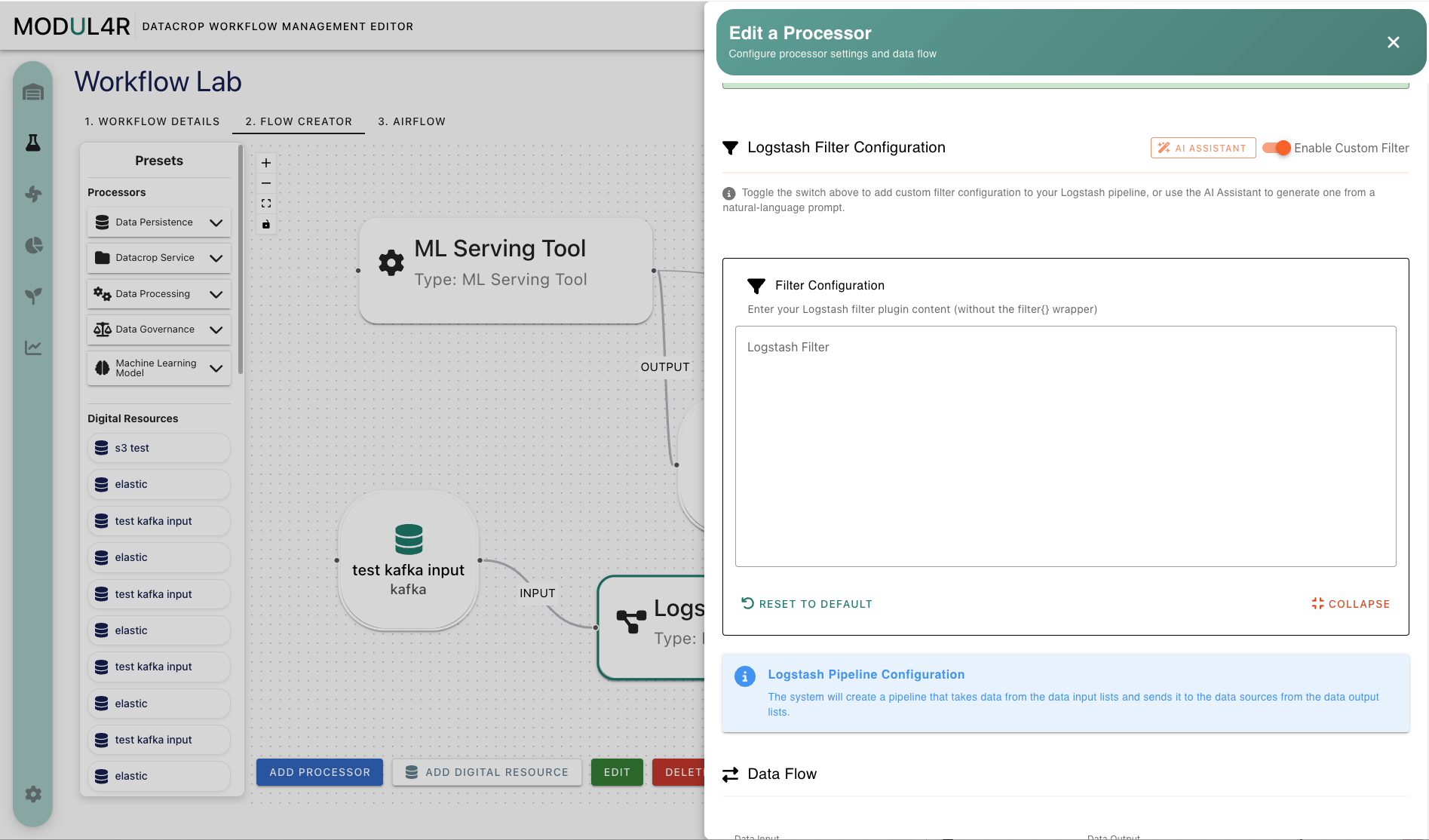
Example of valid content:
mutate {
  add_field => { "environment" => "production" }
}
grok {
  match => { "message" => "%{COMMONAPACHELOG}" }
}
Controls:
- Enable Custom Filter toggle — shows the textarea and includes the filter body in the saved processor manifest. If no content is set, turning it off resets the value to the empty default.
- Reset to Default button — clears the filter back to the empty default.
- Collapse control — hides the editor panel while keeping the section available in the form.
- AI Assistant button — opens the AI Logstash Assistant panel for AI-guided filter authoring.
- Information panel — reminds users that the system creates input and output pipeline sections from selected Digital Resources; the filter editor is only for the transformation section between them.
The filter section is visible only when the selected Processor Type is Logstash Pipeline and the logstash_filter parameter exists in that processor definition.
Empty Pipeline Handling
A pipeline manifest with no eligible inputs, no eligible outputs, and no filter body produces no .conf file and is omitted from pipelines.yml. This prevents the Logstash startup error "Missing Filter End Vertex" that occurs when a pipeline configuration has no vertices. Once you add at least one eligible input, output, or a non-empty filter body and save, the pipeline file is created and Logstash picks it up on the next reload.
How Pipeline Files Are Generated
When a Logstash Pipeline manifest is saved or deleted, the backend calls LogstashManager.reloadLogstash(). It:
- Fetches all Logstash Pipeline processor manifests.
- For each manifest, resolves eligible Digital Resources for each direction using the capability flags.
- Renders a
<name>_<id>.conffrom a Jinja2 template — each plugin block uses the type'slogstashPluginName, falling back to the type display name for backward compatibility. - Regenerates
pipelines.yml, including only active and non-empty pipelines.
The generated files land in the folder configured by the logstash.pipeline.folder environment variable (default: /app/logstash/pipeline/).
Monitoring Logstash Pipelines
The Logstash Monitor sidebar page shows runtime health for saved Logstash Pipeline processor manifests. Use it after saving or updating a pipeline to confirm whether Logstash picked up the generated pipeline and whether events are moving through it.
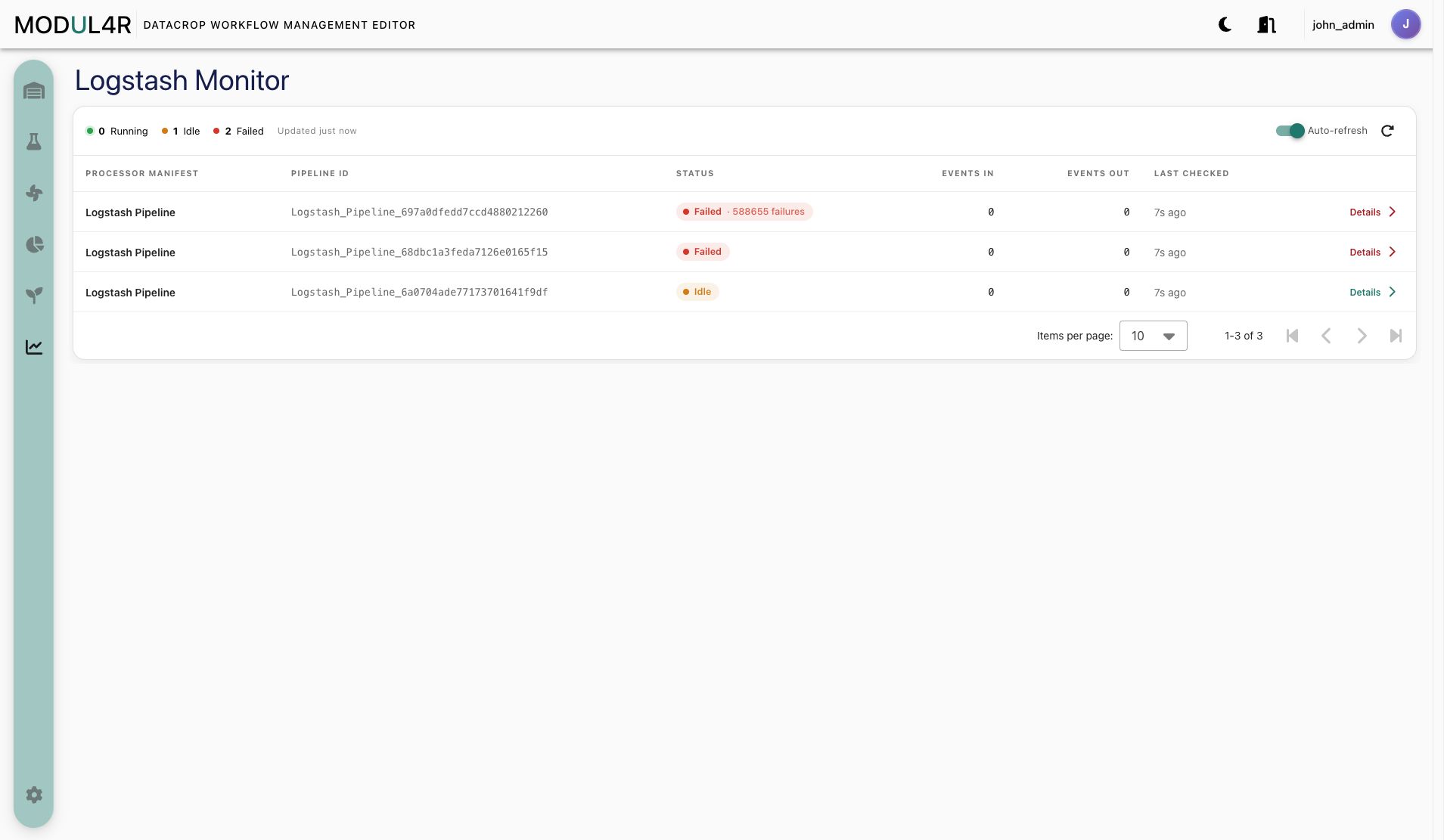
The status cards summarize the current pipeline set:
- Running: pipelines currently reporting healthy activity.
- Idle: pipelines found by the monitor but not currently moving events.
- Failed: pipelines reporting failures or error counters.
The table maps each Processor Manifest to the generated Pipeline ID, then shows:
- Status with any failure count or health note.
- Events In and Events Out counters from Logstash.
- Last Checked timestamp so you can tell whether the status is fresh.
- Details action for inspecting a specific pipeline row.
Troubleshooting
No Digital Resources appear in Data Input or Data Output
The type of those Digital Resources has supportsLogstashInput or supportsLogstashOutput set to false, or logstashCompatible is false. An admin can update the capability flags on the Data Interface Type.
Pipeline does not appear in Logstash after saving
Check that Active is true and that the manifest has at least one eligible input, output, or a non-empty filter body. Also verify that the logstash.pipeline.folder environment variable in the backend matches the path Logstash monitors for its pipeline configurations.
Logstash reports a pipeline error after saving
The most common cause is invalid filter syntax. Verify the filter body uses valid Logstash filter plugin syntax, has no outer filter {} wrapper, and contains no input {} or output {} blocks.
mqtt Digital Resources do not appear in the dropdowns
MQTT is marked logstashCompatible = false and is excluded from both input and output lists by design. There is no built-in Logstash MQTT plugin in standard distributions.
Pipeline changes not picked up after a backend restart
File generation is triggered on save. If the backend restarted without a save event, re-save any Logstash Pipeline manifests or call the POST /user/v1/initialize-resources endpoint to trigger a full reload.