Creating Workflows
This page documents the current Lab implementation: workflow details, flow editor behavior, runtime actions, and template usage.
Before You Start
Prepare these first in Warehouse:
- At least one Processor Definition.
- At least one Digital Resource.
- At least one Worker (unless using existing infrastructure mode where allowed).
See Creating Data Models.
End-To-End Workflow Creation
1) Configure Workflow Details (Required)
- Open Workflow Lab.
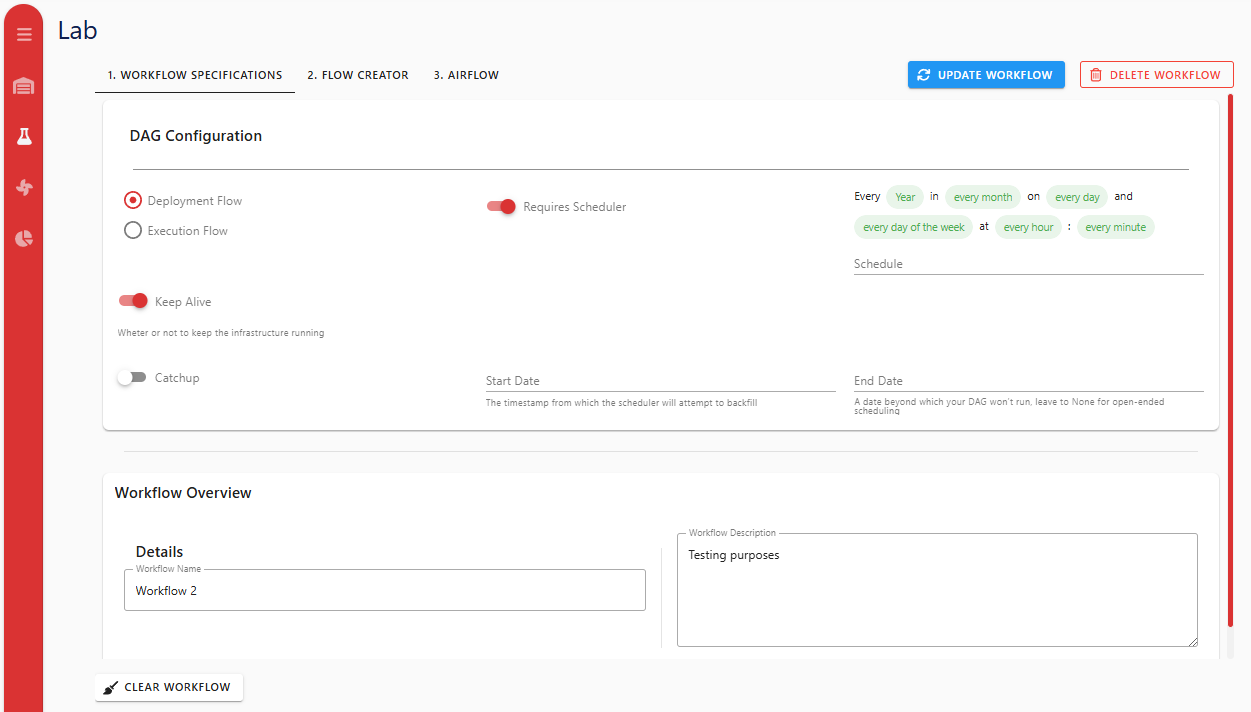
- In 1. Workflow Details, set:
- Workflow Name (required to save/update)
- Workflow Description (optional)
- DAG configuration fields
- If
requires_scheduleris enabled, Schedule is required.
2) Build The Flow Graph
Open 2. Flow Creator and use either approach:
- Processor nodes:
- Click Add Processor, or
- Drag a processor preset from the left panel (this creates and persists a processor instance immediately).
- Digital Resource nodes:
- Click Add Digital Resource, or
- Drag an existing Digital Resource from the left panel.
Double-click a node (or select + Edit) to open configuration forms.
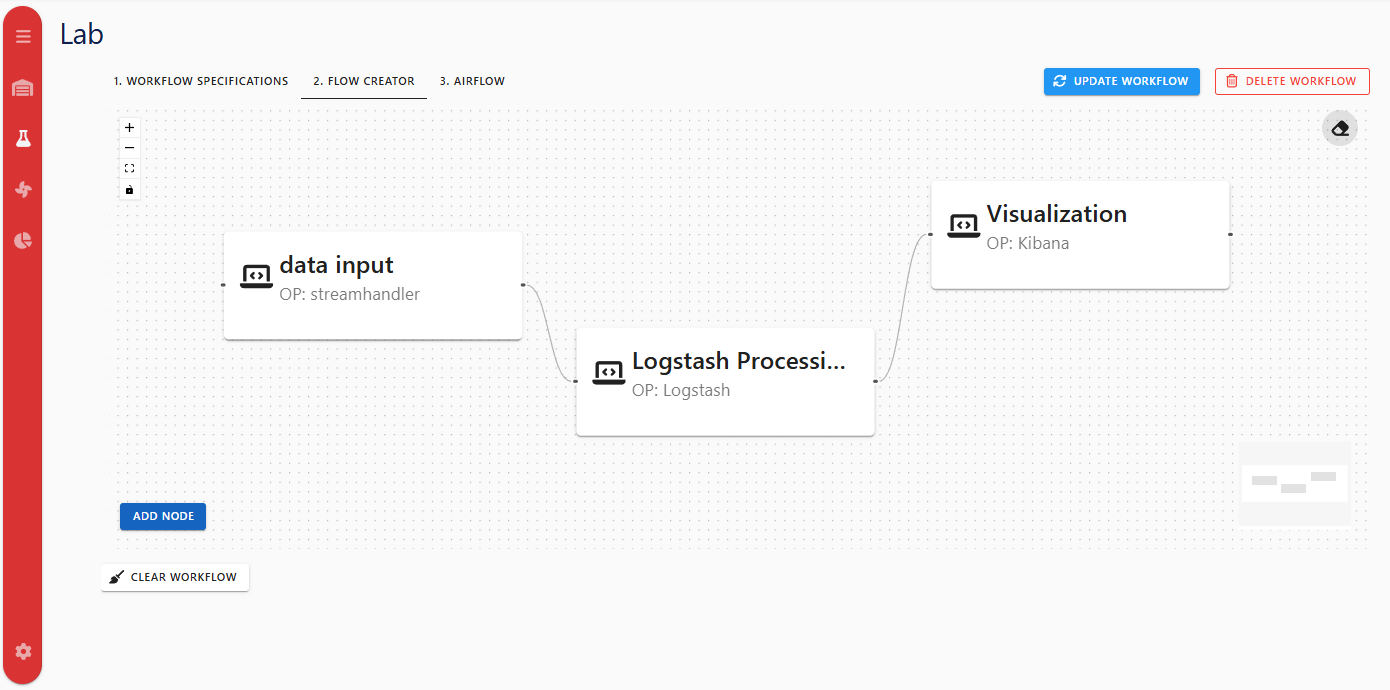
Screenshot note: the current editor also includes template save, DS transfer dialog, and DS inline create/edit dialogs that may not appear in the older image.
3) Configure Processor Nodes
Processor form currently supports:
- General:
name,description. - Deployment:
assetID(worker) required unlessusesExistingInfrastructureis enabled for eligible Data Persistence processors.
- Details:
processorDefinitionReferenceID(required).- parameter values based on selected Processor Definition template.
- Data Flow:
dataInputanddataOutputDigital Resource lists.
Current special behavior:
- Kibana Pipeline:
dataOutputis disabled in form. - Logstash Pipeline:
- DS selection is filtered to interface names
elasticsearch,API REST,kafka. logstash_filtercan be enabled/edited when parameter exists in definition.
- DS selection is filtered to interface names
- Derived Environment Variables preview is shown from selected DS input/output using:
<INTERFACE>_<KEY>_<DIRECTION>
Example directions:
_INPUTfor processor inputs._OUTPUTfor processor outputs.
This matches the processor integration contract in Integrating Custom Processors.
4) Connect Nodes And Transfer Digital Resources
Direct DS <-> Processor links
- Connect DS -> Processor to add DS to processor
dataInput. - Connect Processor -> DS to add DS to processor
dataOutput.
These edges are labeled INPUT or OUTPUT.
Processor -> Processor links (Transfer dialog)
Connecting two processor nodes opens Transfer Digital Resources between Processors.
Available options:
- Select source output DS values to add into target inputs.
- Select target input DS values to add into source outputs.
- Select one existing DS for both sides.
- Create a new DS for both sides.
- Proceed without transfer.
5) Save / Update Behavior
- Save (new workflow) and Update (existing workflow) are disabled until:
- workflow name is present, and
- schedule is provided when
requires_scheduler=true.
- Payload includes workflow nodes/edges plus compatibility fields (
dataProcessors,edgeConf). - After save/update, Lab warns that Airflow visibility can take up to two minutes.
6) Run / Stop Behavior
From Lab toolbar or Warehouse workflow row actions:
- Run triggers workflow DAG via
dagConf.dag_id. - Stop triggers teardown DAG by appending
_teardownto the same DAG id. - In Warehouse tables, these actions are shown as Deploy and Stop for workflow rows.
7) Airflow Views In Lab
- Unsaved workflows show warning in Lab Airflow tab.
- Saved workflows show toggle:
- Deployment DAG
- Teardown DAG
- Embedded grid iframe path in Lab is derived from workflow name/id formatting.
For global Airflow iframe behavior, see Airflow.
Kibana monitoring is not part of Lab tabs; it is available as a separate sidebar page.
8) Workflow Templates
Template features currently available:
- In Lab flow editor: Save as Template.
- In Warehouse Workflows tab:
- Create Workflow from Template
- Edit/Delete template when user is owner or admin.
Common Constraints And Validation Notes
- Worker is required for most processors when not using existing infrastructure mode.
- Processor Type must be selected before parameter template values can be filled.
- DS links and processor-to-processor transfer update processor input/output lists used by runtime env-var injection.
Troubleshooting
- Save/Update disabled: set workflow name; if scheduler is enabled, provide schedule.
- Run/Stop shows DAG id warning: ensure
dag_idexists in workflow DAG configuration. - Workflow not visible in Airflow immediately: allow up to two minutes after save/update.
- Graph edits not reflected in backend yet: explicit Update is the safest persistence action for existing workflows.
- Cannot assign output for Kibana Pipeline: this is intentional in current PM form behavior.